BUILDING A MULTI FUNNEL SITE
First of all, I want to congratulate you for downloading and installing this funnel template into your System.io account.
Below this text you will see an image that begins with the Founders Hub logo.
Below the logo is the title for this Multi Funnel Layout:
“Funnel Hacking Secrets”“Building A Multi Funnel Site ”
Then below the title is the actual layout of the website and its associated pages that show you how two diffrent funnels should be added to the website. You can add a third, fouth, fifth funnel etc, but rember to ensure that the pages for each funnel are in the correct order within the overall site layout.
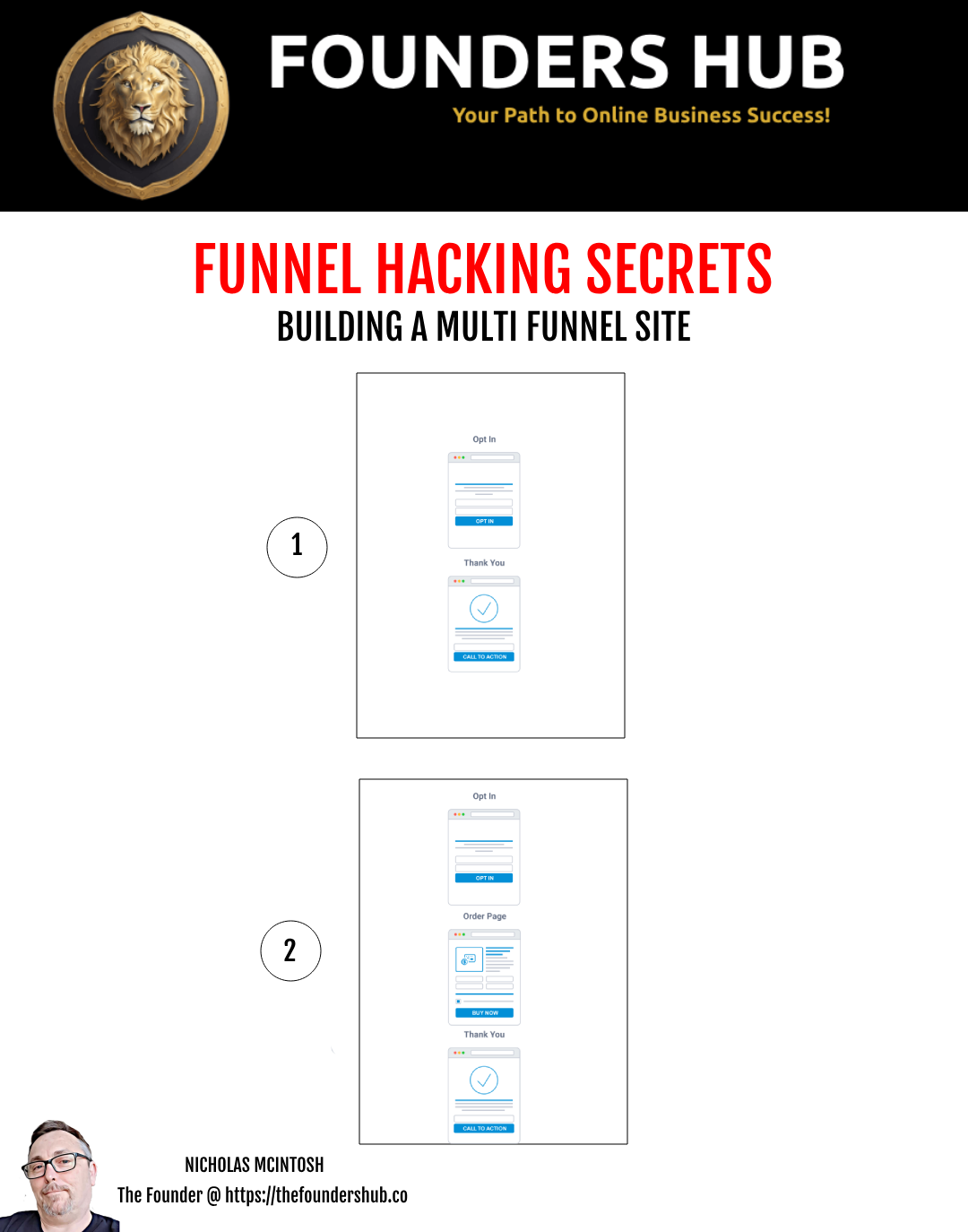
FUNNEL 1
HOW THIS FUNNEL WORKS
Below this text you will see an image that begins with the Founders Hub logo.
Below the logo is the title for this funnel type:
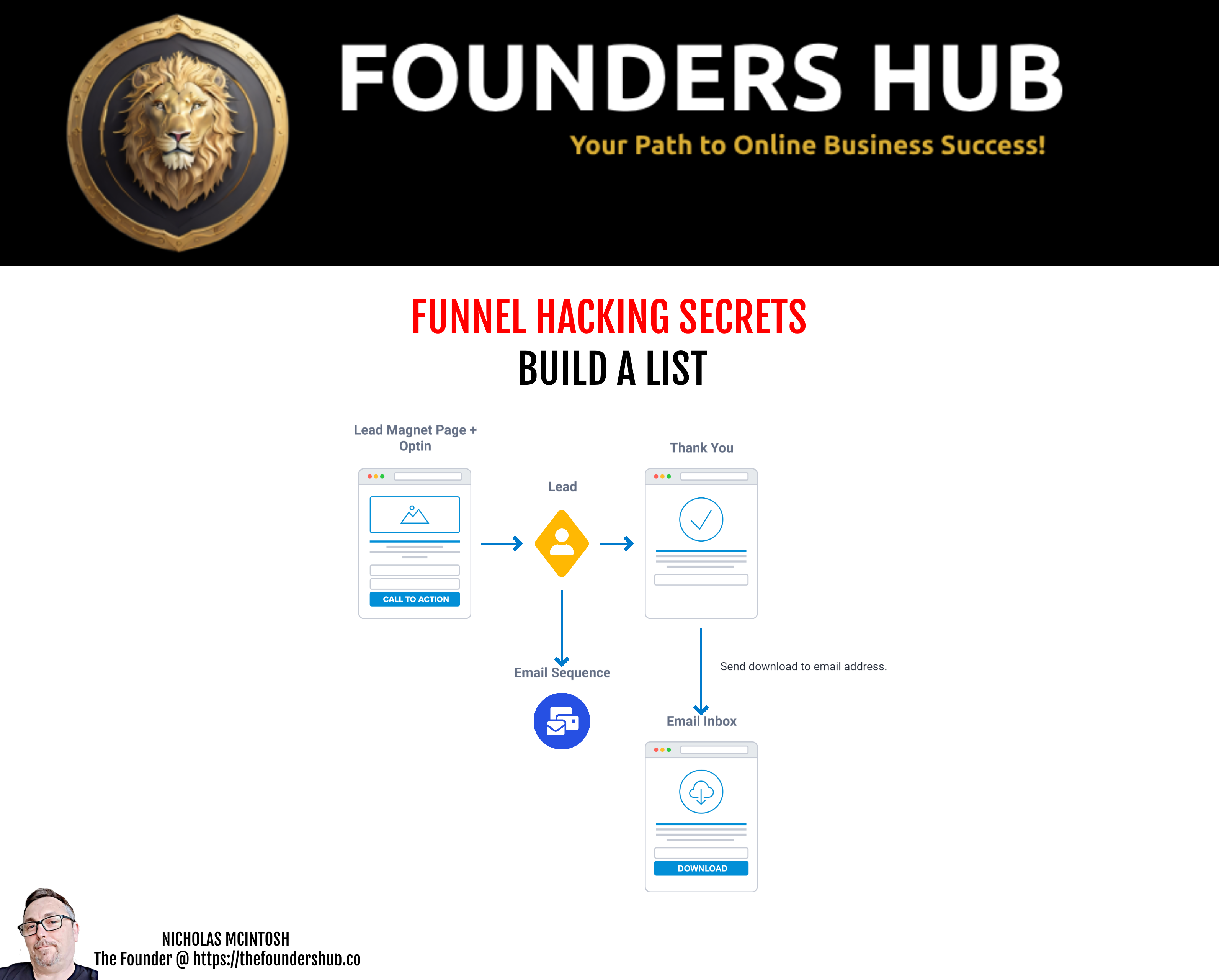
“Funnel Hacking Secrets”“Build a List ”
Then below the title is the actual layout of the funnel and its associated pages.
So how does this Funnel work?
Great question so let's run through it, so you get a good understanding of what you need to do to complete this funnel build.
Step 1
Step 1 in the funnel contains information on the Lead Magnet and an opt in section. On this page we are simply asking the user to provide a name and an email address to access the next page in the funnel.
When you commence editing this page you will notice we have crafted a layout for you. You will need to provide the text and images to help you convert prospects, in this case it will be an eBook.
Step 2
After the user has completed their name and email in Step 1, they will be redirected to funnel Step 2. Funnel Step 2 is a thank you / download information page for the product.
Just like with Funnel Step 1 you will need to edit this page and provide the text and images required.
Note: You must already have your E book created before editing this page.
This page is designed to inform the user that the eBook will be delivered to them Via the email address they entered into the form in Step 1.
An automation rule will be established on this page to automatically deliver the book to the user immediately upon their email confirmation.
By delivering the eBook via email, it prevents the ability for anyone to provide your thank you page to someone else, allowing them to download the eBook directly.
IMPORTANT LAST STEPS
In the very last section about the BONUS HOME PAGE, you will note that there is some more information about a homepage for your website. You can if you wish, use this page template as the beginning of your website and attach all your additional funnels, products and services to it as you build new ones. Click here for an example of this (The Founders Hub Home Page)
Alternatively, you may wish to just delete the page and just focus on having the first step of the funnel as your websites home page.
Whichever option you choose don't forget to either delete this page, the one you are viewing right now with all these instructions or move it to the bottom of the funnel.
FUNNEL 2
HOW THIS FUNNEL WORKS
Below this text you will see an image that begins with the Founders Hub logo.
Below the logo is the title for this funnel type:
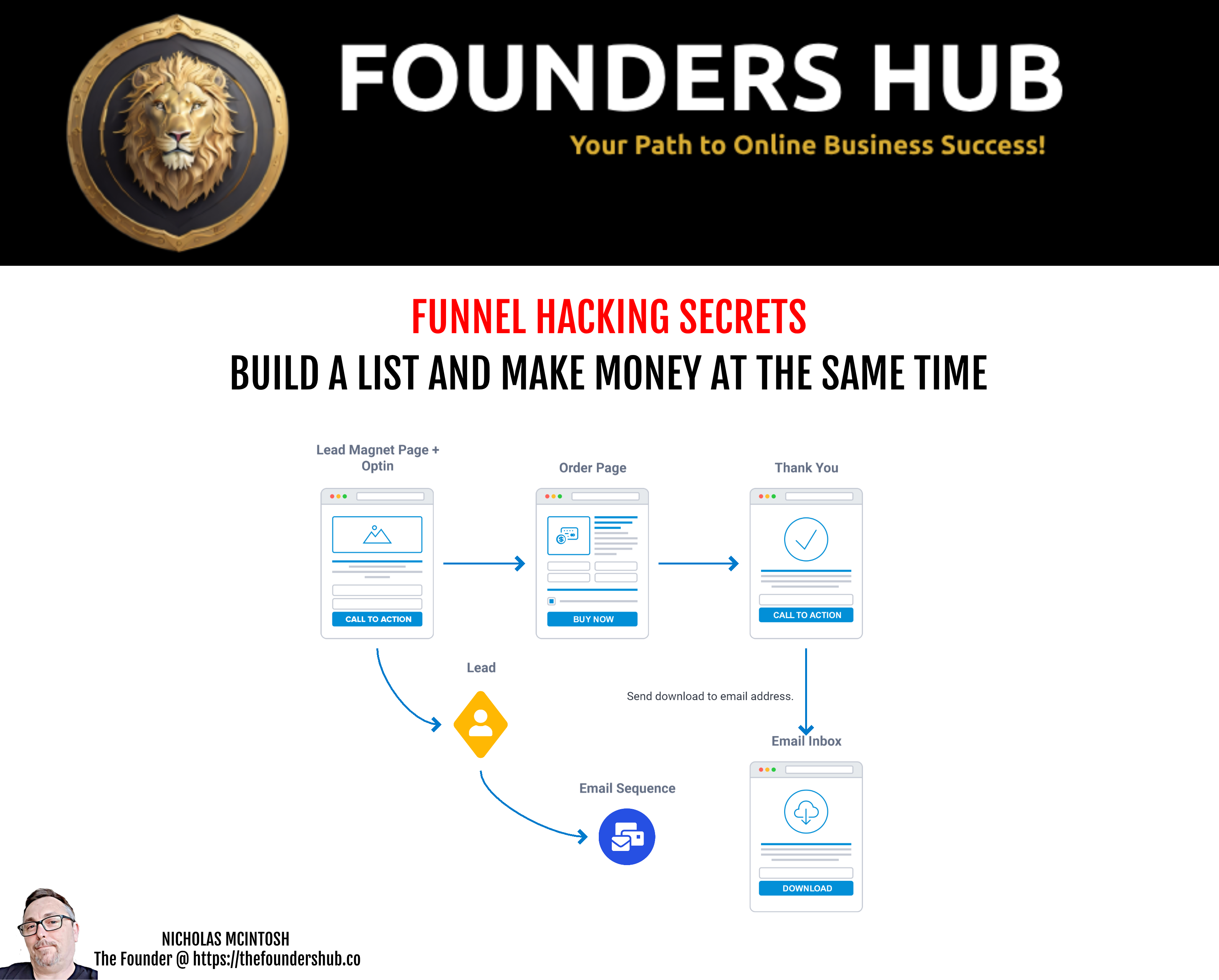
“Funnel Hacking Secrets”“Build a List and Make Money at the Same Time”
Then below the title is the actual layout of the funnel and its associated pages.
So how does this Funnel work?
Great question so let's run through it, so you get a good understanding of what you need to do to complete this final build.
Step 1
Step 1 in the funnel is the lead magnet and opt in page. On this page we are simply asking the user to provide a name and an email address to access the next page in the funnel.
When you commence editing this page you will notice we have crafted a layout for you. You will need to provide the text and images to help you sell your product, in this case it will be an eBook.
Step 2
After the user has completed their name and email in Funnel Step 1, they will be redirected to Funnel Step 2. Funnel Step 2 is an order page to purchase the product.
Just like with Funnel Step 1 you will need to edit this page and provide the text and images required to help you sell this product.
Note:You must already have your E book created before editing this page.
In some cases, a prospect who arrives on Funnel Step 2 may not purchase the product. For those that do not purchase the product, the funnel for them is completed, but that's OK,
Either way, with or without a purchase, the prospect is now on our email list, and we can follow them up with a series of automated emails (a Campaign Sequence) encouraging them to purchase the offer.
Step 3Just like with Funnel Steps 1 and 2, you will need to edit this page and provide the text and images required to help the prospect understand how their eBook will be delivered to them.
If the prospect made the purchase in Step 2 they will then be redirected to the final page in this funnel which is the thank you / download information page.
This page is designed to inform the user that the eBook will be delivered to them via the email address they entered into the form in Step 2.
An automation rule will be established on this page to automatically deliver the book to the user immediately upon their payment clearing. If you prospects payment fails, they will not receive the eBook.
By delivering the eBook via email, it prevents the ability for anyone to provide your thank you page to someone else, allowing them to download the eBook directly.
IMPORTANT LAST STEPS
In the very last section about the BONUS HOME PAGE, you will note that there is some more information about a homepage for your website. You can if you wish, use this page template as the beginning of your website and attach all your additional funnels, products and services to it as you build new ones. Click here for an example of this (The Founders Hub Home Page)
Alternatively, you may wish to just delete the page and just focus on having the first step of the funnel as your websites home page.
Whichever option you choose don't forget to either delete this page, the one you are viewing right now with all these instructions or move it to the bottom of the funnel.
AFFILIATE FUNNEL 1
HOW THIS FUNNEL WORKS
Below this text you will see an image that begins with the Founders Hub logo.
Below the logo is the title for this funnel type:
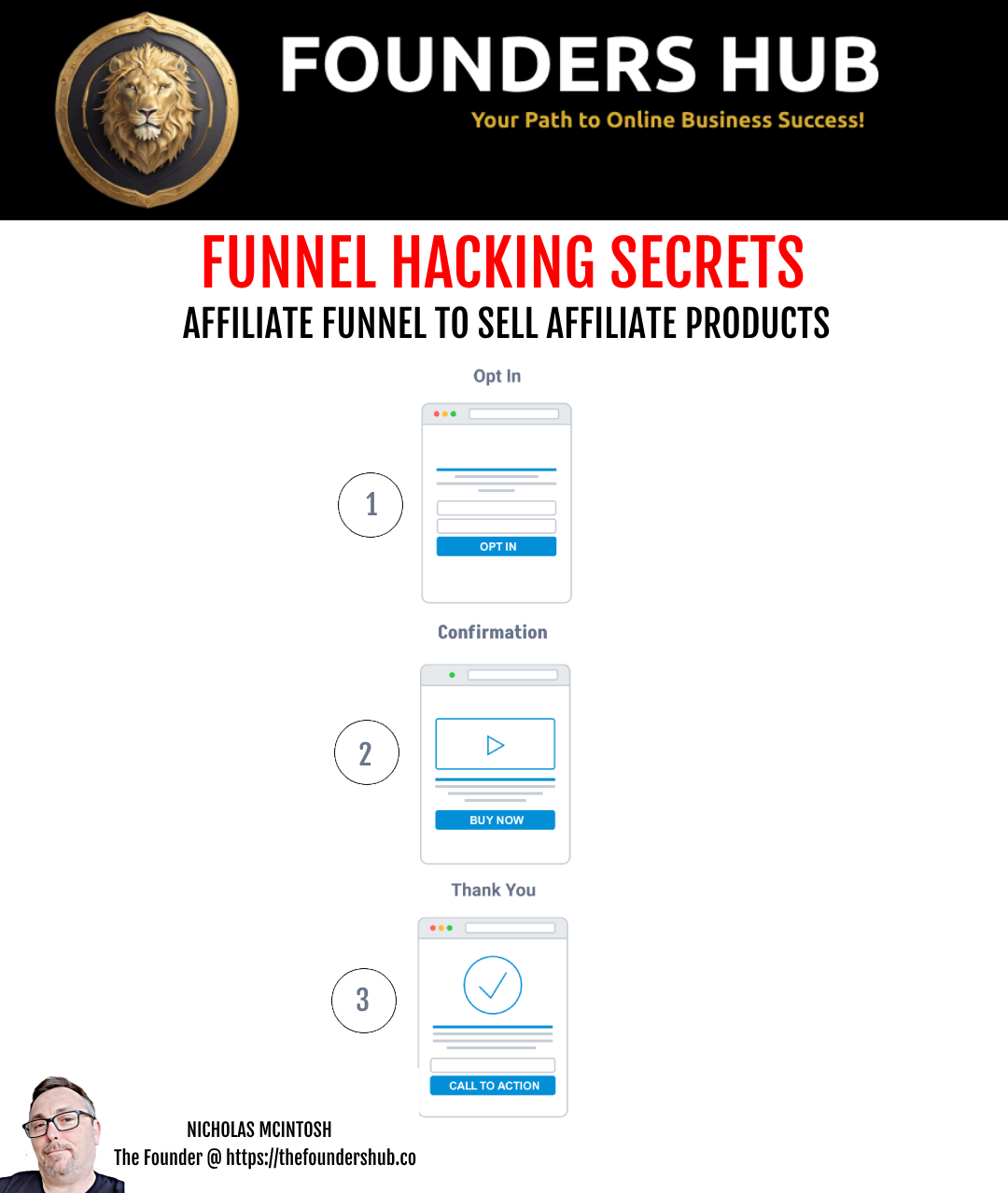
“Funnel Hacking Secrets”“Affilite Funnel To Sell Affiliate Products”
Then below the title is the actual layout of the website and its associated pages that show you how two diffrent funnels should be added to the website. You can add a third, fouth, fifth funnel etc, but remember to ensure that the pages for each funnel are in the correct order within the overall site layout.
So how does this Funnel work?
Great question so let's run through it, so you get a good understanding of what you need to do to complete this funnel build.
Step 1
Step 1 in the funnel contains information on the Affilite Product and an opt in section. On this page we are simply asking the user to provide a name and an email address to access the next page in the funnel.
When you commence editing this page you will notice we have crafted a layout for you. You will need to provide the text and images to help you convert prospects, in this case it will be all the information about the benefits and features for the Affilte Product you are promoting.
Step 2
After the user has completed their name and email in Step 1, they will be redirected to funnel Step 2. Funnel Step 2 is a thank you information page to access the product and should contain your Affiliate Link.
Just like with Funnel Step 1 you will need to edit this page and provide the text and images required.
Note: You must already have your Affilite Images, a Video and other Information about the Affilite Product created before editing this page.
This page is designed to inform the user about the Affiliate Product you are promoting. It captures the name and email address they entered into the form in Step 1. This way you can follow up with them via an email sequence to provide more information and add in your affilite link in every email to boost the chances of making a sale!
An automation rule will be established on this page to automatically deliver the email sequence to the user immediately upon their email confirmation.
IMPORTANT LAST STEPS
In the very last section about the BONUS HOME PAGE, you will note that there is some more information about a homepage for your website. You can if you wish, use this page template as the beginning of your website and attach all your additional funnels, products and services to it as you build new ones. Click here for an example of this (The Founders Hub Home Page)
Alternatively, you may wish to just delete the page and just focus on having the first step of the funnel as your websites home page.
Whichever option you choose don't forget to either delete this page, the one you are viewing right now with all these instructions or move it to the bottom of the funnel.
BONUS HOME PAGE
HOW THIS PAGE WORKS
Bonus Home Page
In the funnel we have created you a home page for your website.
Just like the above funnel steps you'll need to edit the content on this page and provide your own text and images.
One thing to note about this page is it provides you with a menu where you can link to the first step in each of your funnels.
This allows you to have a home page, some view it as the main page of their website, and links to other areas of your website like your funnels, your products and services, or any other type of information you wish to provide to your potential customers.